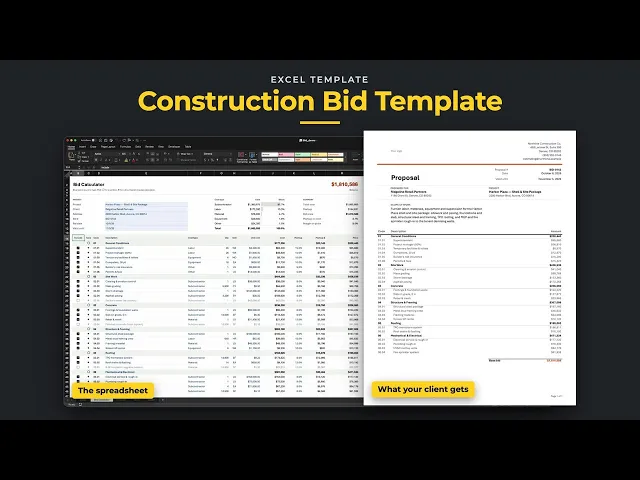
Estimate, take off, and mark up a job in one workbook. The Bid Calculator tab is where the whole bid gets built. Pick ◯ to start a section and ◆ for each line. Every line carries a cost type, quantity, unit and unit cost, plus its own markup. Codes number themselves, each section adds itself up, and the top of the sheet shows cost by type and one bid price. Uncheck a line and it drops out of the bid without being deleted.
Excel 2021
Excel 365
Excel Table · grows as you add lines
No macros
Nothing locked
Built for any trade that bids line by line. The columns are the same for everyone: cost type, quantity, unit, unit cost and markup. Only the lines change. Pick your trade to see a sample bid.

Sample jobs for illustration. Numbers vary by market.
01
Every line has a cost type: subcontractor, labor, material, equipment or other. The table at the top shows what each one costs and its share of the job before you send a number.
02
Type a markup % on each line. Markup dollars, the price, markup on cost and margin on price all update on their own, so the math is right every time.
03
Pick ◯ to start a section and ◆ for each line. Codes like 02.03 number themselves and every section adds itself up. Uncheck a line and an option drops out of the bid without being deleted.
04
The Proposal tab puts the bid on your letterhead with your logo and one accent color from Setup. Show or hide the line items with one switch. The Terms page prints behind it with a payment schedule and signatures.
Unlock the library and get this ready-to-use template, with all tabs, formulas, and workflows already connected, plus every other template in the collection.
once
This template plus the other three, built and tested.
- Construction Bid Template
- Job Costing Tracker
- Construction Project Tracker
- Schedule of Values