Construction Bid Template
Send cleaner bids in minutes.
Built in Excel for contractors who need fast, professional estimates without new software.
Instant Downloads · Lifetime Access · One-Time Payment

The whole reason this exists
Here's something true about good contractors.
You can walk a job site, look at it for ten minutes, and basically know the number. Materials, crew, how long it'll take, where the client's going to try to nickel-and-dime you. It's in your head before you're back in the truck. That part you're great at. You've done it a thousand times.
So why does turning that number into a bid you can actually send take the rest of your weekend?
It shouldn't. And it doesn't have to.
Quick story.
My dad's been a commercial contractor in Georgia for about 30 years. Churches, restaurants, shopping plazas, the kind of jobs with a lot of zeros on them. New builds, big renovations, all of it. (He built the house I grew up in too, but the real work was always commercial.) The man can price a job in his sleep.
But every time a real bid came in, I'd watch him lose an entire Sunday to it. Not because the math was hard. Because he was basically building the same bid three times.
Once for himself, so he knew his actual cost and didn't lose his shirt. Then a cleaner one for the client, because you can't hand a developer your messy internal sheet with your margins sitting right there in column G. Then a third version with terms and a signature line, so when they said yes, the job was actually locked in and not just a handshake.
Three versions. Same numbers. And the second he changed one thing, like bumping the markup or adding a line he forgot, he'd have to go hunt through all three and fix it everywhere. Miss one, and now your contract says $480,000 and your estimate says $520,000 and you look like an amateur in front of a client who's about to hand you half a million dollars.
That's not a math problem. That's a spreadsheet problem.
So I fixed his spreadsheet.
Gallery
One file. Three tabs. You only build one.
You build the bid in one place, the Bid Calculator. Categories, line items, markup per line (subs at one rate, materials at another, because of course they're different). The total bid price rolls up into a single cell, X10. That's the number you quote.
Done.
You never touch the other two tabs. The Estimate and the Term Sheet write themselves off the Bid Calculator. Click between them and watch the same total carry across:


Group the Job the Way You Built It.
Mark a row ◯ under Type and it becomes a section header. Every ◆ line you add beneath it rolls into that section's subtotal, and into the bid total up top.

You Pick What Lands on the Estimate.
Type a ✓ in the Print column and that line shows up on the client Estimate. Clear it and the line stays internal, still counted in your totals, just not printed.
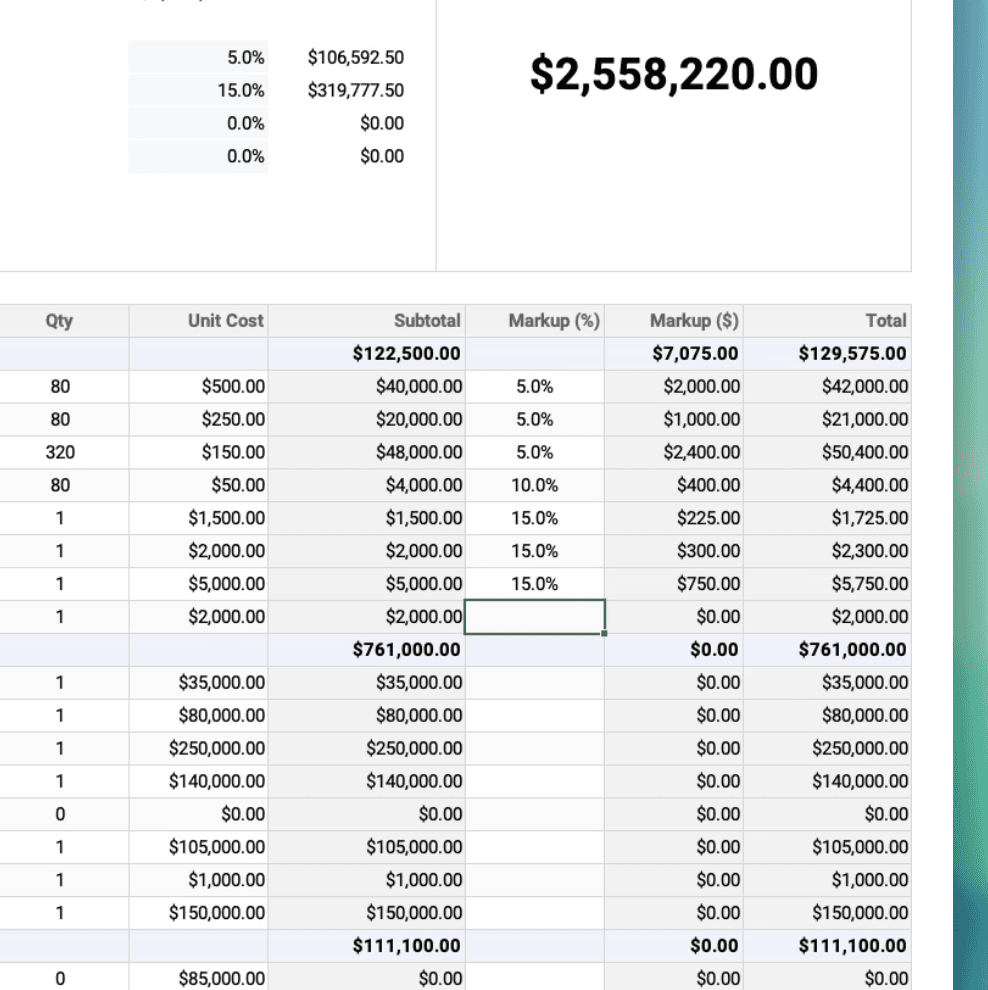
Different Markup on Every Line.
Set 5% on subs, 15% on materials, 20% on labor and watch the Total Bid Price recalculate live. One blanket markup isn't how real bids work.

The Question Everyone Asks: Adding a Row.
Copy an existing row, right-click and insert a blank one, paste, then clear the old data. The new line inherits every formula and dropdown. It's the only trick you'll ever need.
Audience
So, is this you? Be honest. It's not for everyone.
This is for you if you...
Bid jobs out of a spreadsheet right now, and the spreadsheet is fighting you.
Are a GC or sub who quotes the work, then has to dress it up for the client.
Have lost a Sunday to rebuilding the same bid three times in three places.
Want a file you own, on your machine, that nobody can switch off.
Skip it if you...
Want an enterprise platform with seats, logins, and a sales call.
Need it to run live in Google Sheets with zero fiddling (it's Excel-first).
Already pay for estimating software you actually like.
Bid one job a year. The Sunday you'd save isn't worth $97 to you.
A few things I'll tell you straight.
It's built in Excel
Excel 365 or 2021 and up, and that's where it works best. Convert it to Google Sheets and some formulas break (the stuff that makes the tabs talk to each other). If you're set on Sheets, screenshot the formulas, paste them into ChatGPT, and ask it to rebuild them Sheets-compatible. It takes a little fiddling, but people do it. I'd rather tell you up front than have you find out after.
No subscription. Ever.
No login, no "starter plan." I'm not building a SaaS. There's nothing recurring lurking behind this. You buy it, it's yours, and you use it on every job for the rest of your career.
You can add rows without breaking it
The thing everyone worries about with a template: you add a line and the formulas explode. The guide shows you the four-step way to insert a row that keeps every formula intact. That's the only trick you'll ever need to learn. Click any cell and read the logic. Nothing hidden, nothing locked. You customize it like it's yours, because it is.
The whole library · $97 · One time
I'm not going to sell you one spreadsheet.
Construction Bid Template
Included
Job Costing Tracker
Included
Construction Project Tracker
Included
Schedule of Value
Included
Every Template I Build Next
Included Free
$97
one-time
One month of the estimating software my dad turned down costs more than this whole shelf. $97 is roughly the markup on a single change order, and it buys back a Sunday on every bid from here on out. I'll let you do that math, since doing math in your head is the thing you're already good at.
Instant access · Built in Excel · Yours forever
Faq
Common questions answered clearly
The questions that come up most. Here's where they get answered.
What exactly do I get, and how fast?
Do I need to be good with spreadsheets to use it?
Which version of Excel do I need? Does it work on a Mac?
What happens when you release new templates?
Does it come in Google Sheets?
What if it doesn't fit how I work?
instant downloads