All Access Pass 50% Off — Limited Time
All Access Pass 50% Off — Limited Time
All Access Pass 50% Off — Limited Time
Built for simple attendance
Built for simple attendance
Attendance Tracker for Excel + Google Sheets
Track attendance, view summaries, and stay on top of daily and group performance at a glance.
Excel
Google Sheets
Excel
Google Sheets
Files unlock after license activation.
One-time payment includes full access to the template library.
One-Time Purchase
Excel & Sheets Ready
Sample + Blank Files
Excel 365 / Excel 2021+ Required
One-Time Purchase
Excel & Sheets Ready
Sample + Blank Files
Excel 365 / Excel 2021+ Required
One-Time Purchase
Excel & Sheets Ready
Sample + Blank Files
Excel 365 / Excel 2021+ Required


Wave goodbye to
Wave goodbye to
Wave goodbye to
missing names
wrong counts
messy rosters
manual tallies
late updates
duplicate entries
spreadsheet chaos
missing names
wrong counts
messy rosters
manual tallies
late updates
duplicate entries
spreadsheet chaos
missing names
wrong counts
messy rosters
manual tallies
late updates
duplicate entries
spreadsheet chaos
missing names
wrong counts
messy rosters
manual tallies
late updates
duplicate entries
spreadsheet chaos
A Closer Look
A Closer Look
See What’s Inside the Template
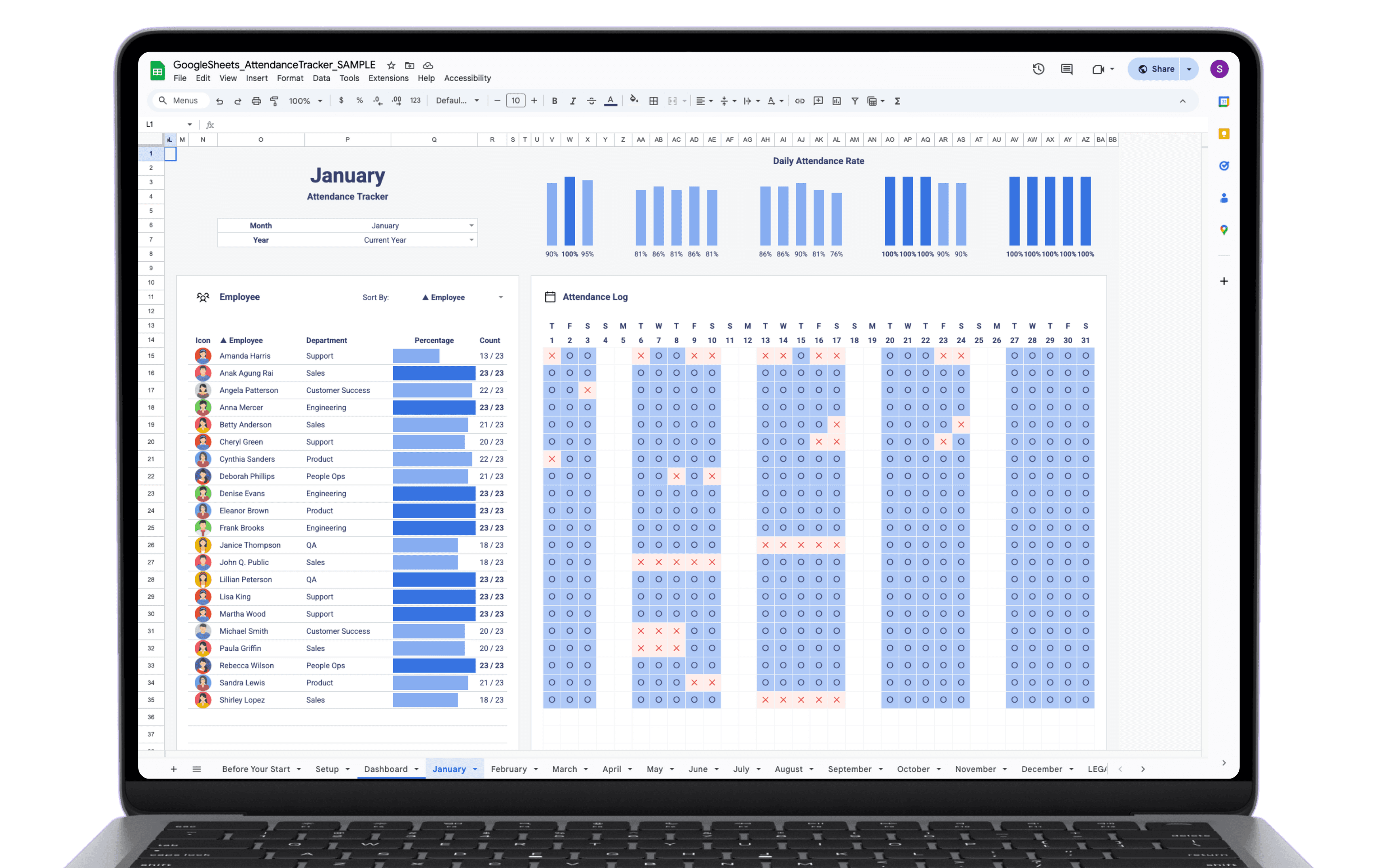
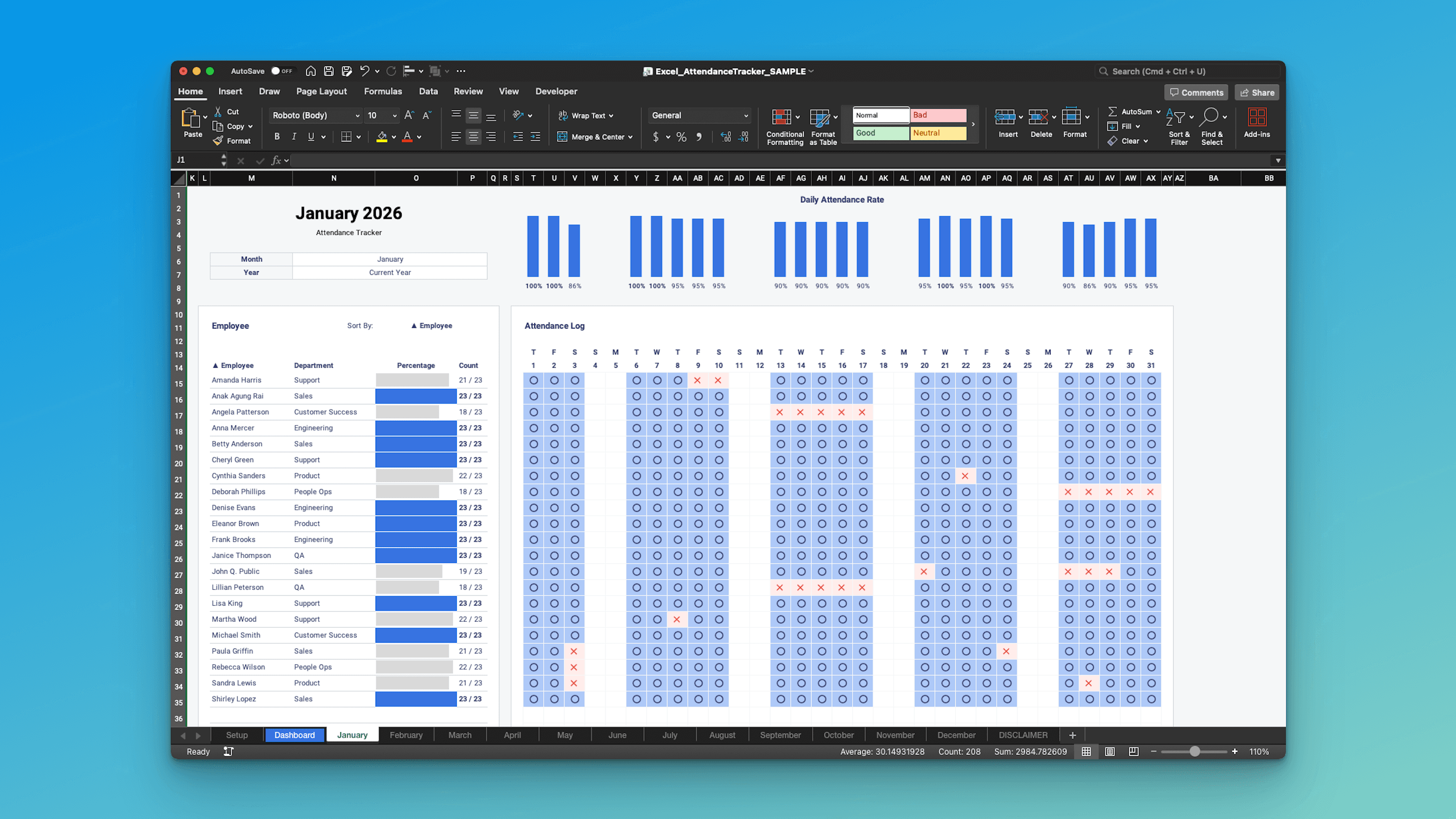
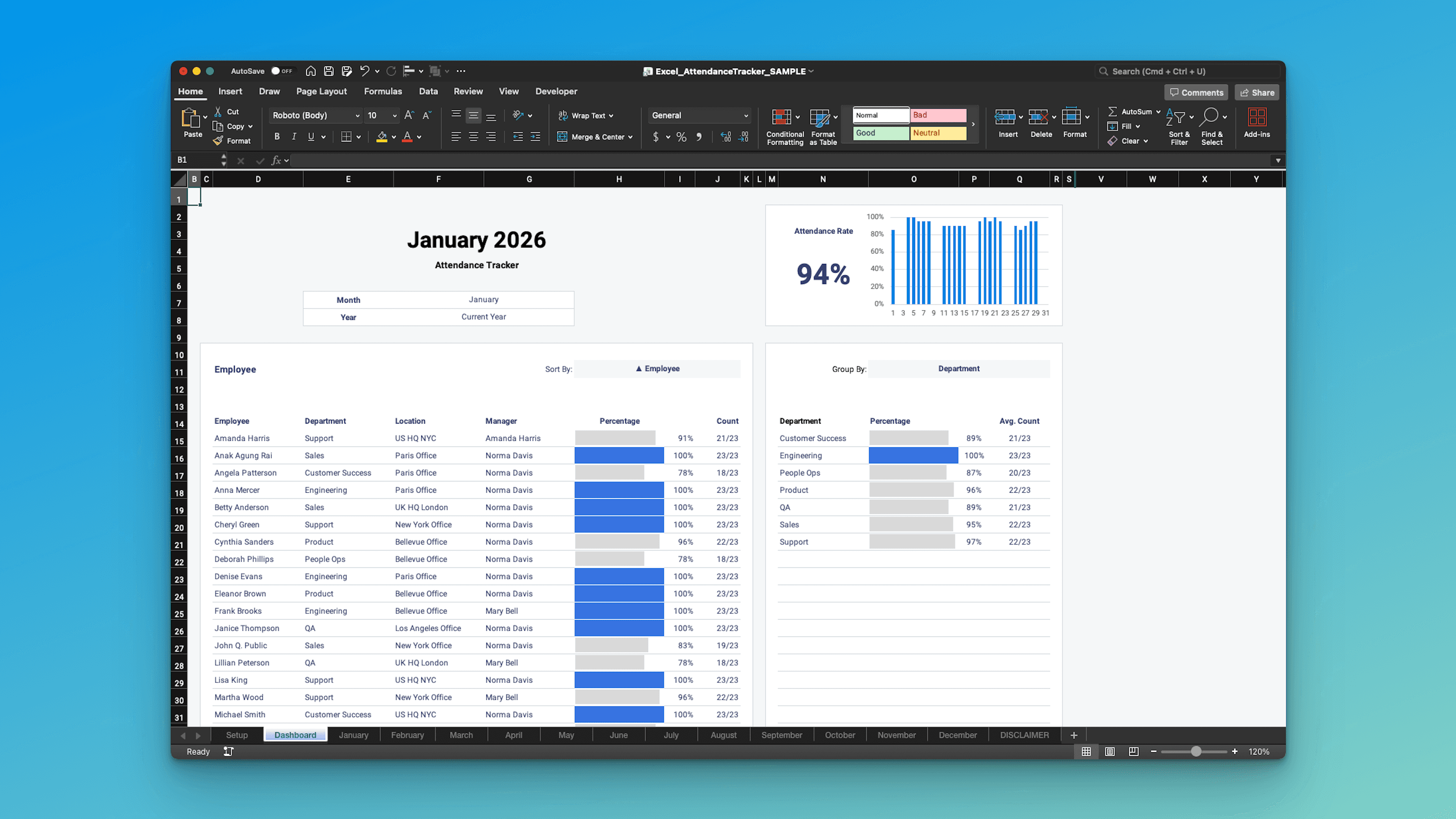
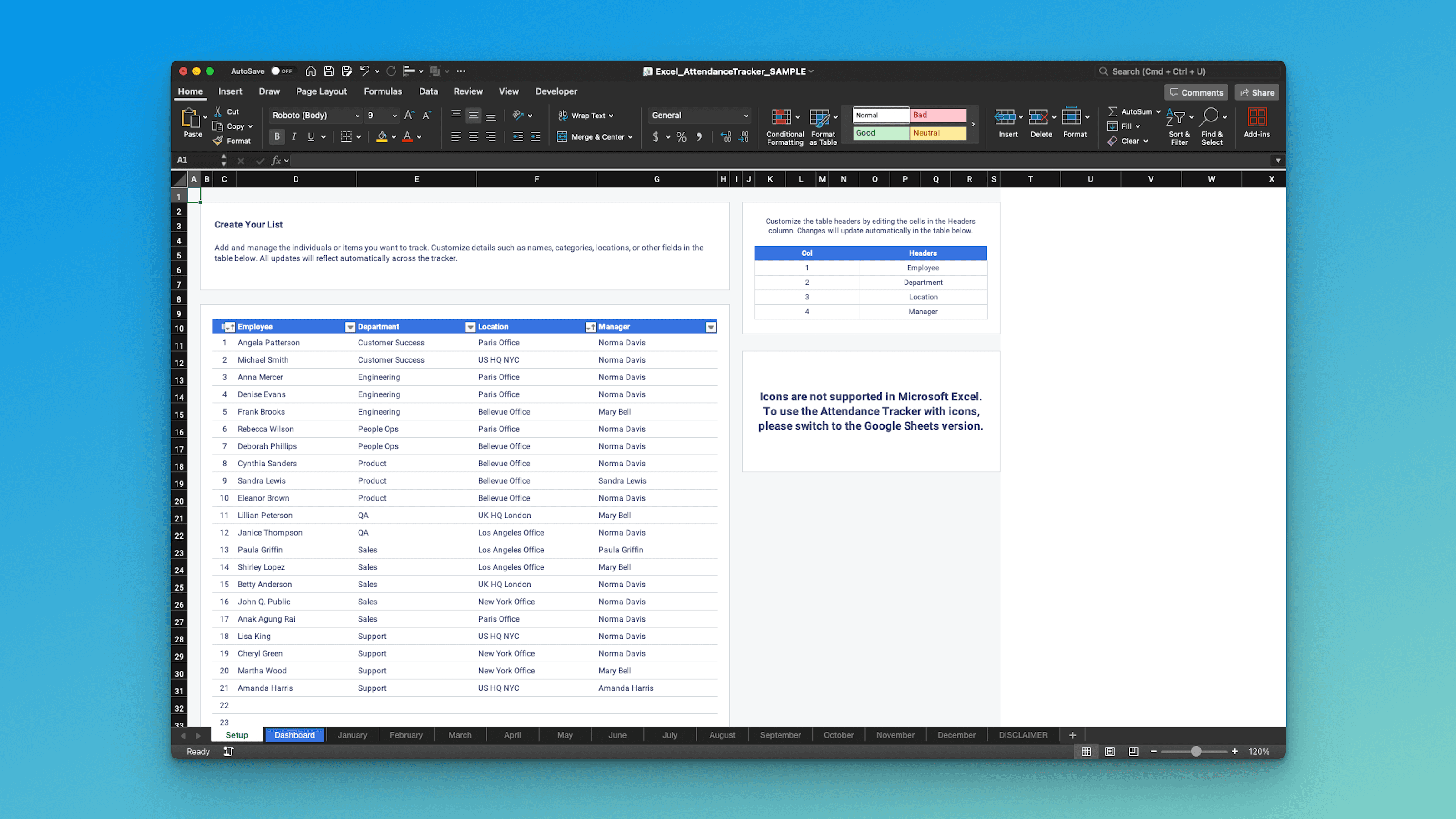
Each tab keeps things simple. Put the info in the right place and the template does the rest.
Excel
Google Sheets
Excel
Google Sheets
Excel
Google Sheets
Dashboard Tab
Everything rolls up here. Sort and filter to get a clean view of attendance by month, employee, or team.
Dashboard Tab
Everything rolls up here. Sort and filter to get a clean view of attendance by month, employee, or team.
Dashboard Tab
Everything rolls up here. Sort and filter to get a clean view of attendance by month, employee, or team.
Monthly Tabs (12)
Quick daily tracking for each month. Mark attendance in seconds and let totals feed the dashboard automatically.
Monthly Tabs (12)
Quick daily tracking for each month. Mark attendance in seconds and let totals feed the dashboard automatically.
Monthly Tabs (12)
Quick daily tracking for each month. Mark attendance in seconds and let totals feed the dashboard automatically.
Setup Tab
Add employees, teams, and your start month once. The rest of the tracker builds from here.
Setup Tab
Add employees, teams, and your start month once. The rest of the tracker builds from here.
Setup Tab
Add employees, teams, and your start month once. The rest of the tracker builds from here.
Key Features
Key Features
A Better Way to Track Attendance in Excel & Google Sheets
Built in features that simplify the workflow, so you can get to the output faster.
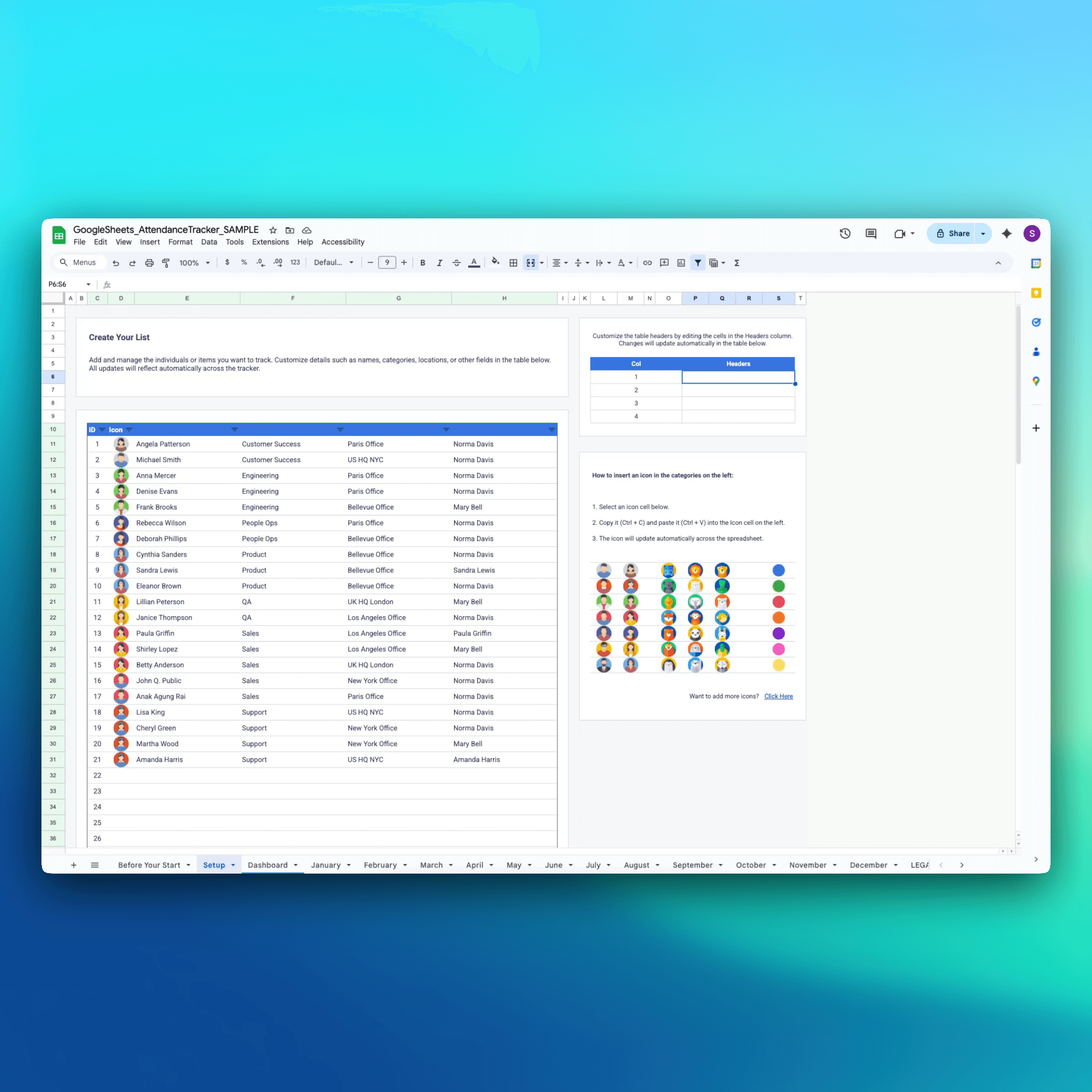
Customize Once, Use Forever
Raw setup gets forgotten every month. This Setup tab lets you define everything in one place—headers, fields, employees—so the entire year stays consistent without redoing work.
Customize Once, Use Forever
Raw setup gets forgotten every month. This Setup tab lets you define everything in one place—headers, fields, employees—so the entire year stays consistent without redoing work.
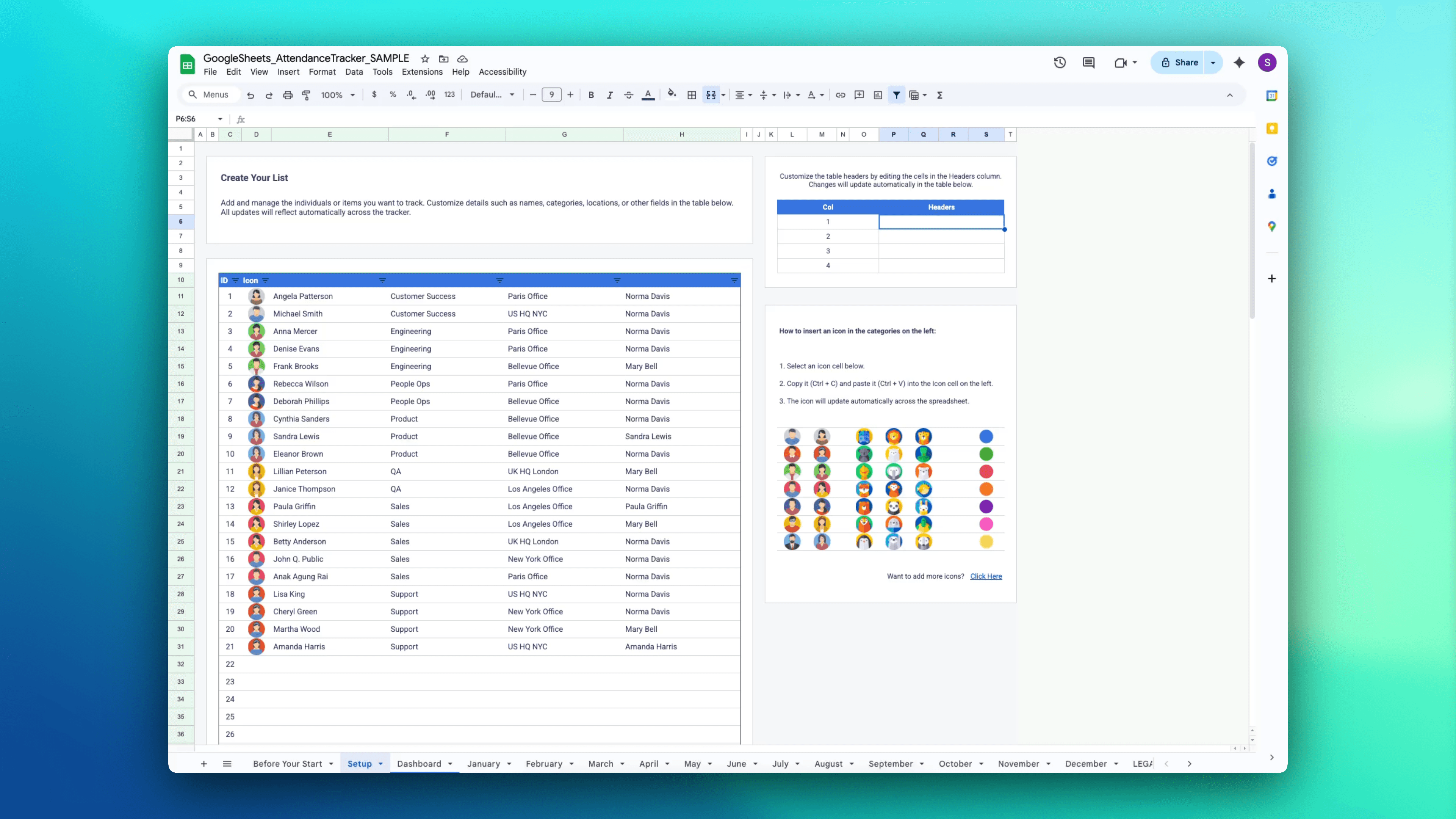
Customize Once, Use Forever
Raw setup gets forgotten every month. This Setup tab lets you define everything in one place—headers, fields, employees—so the entire year stays consistent without redoing work.
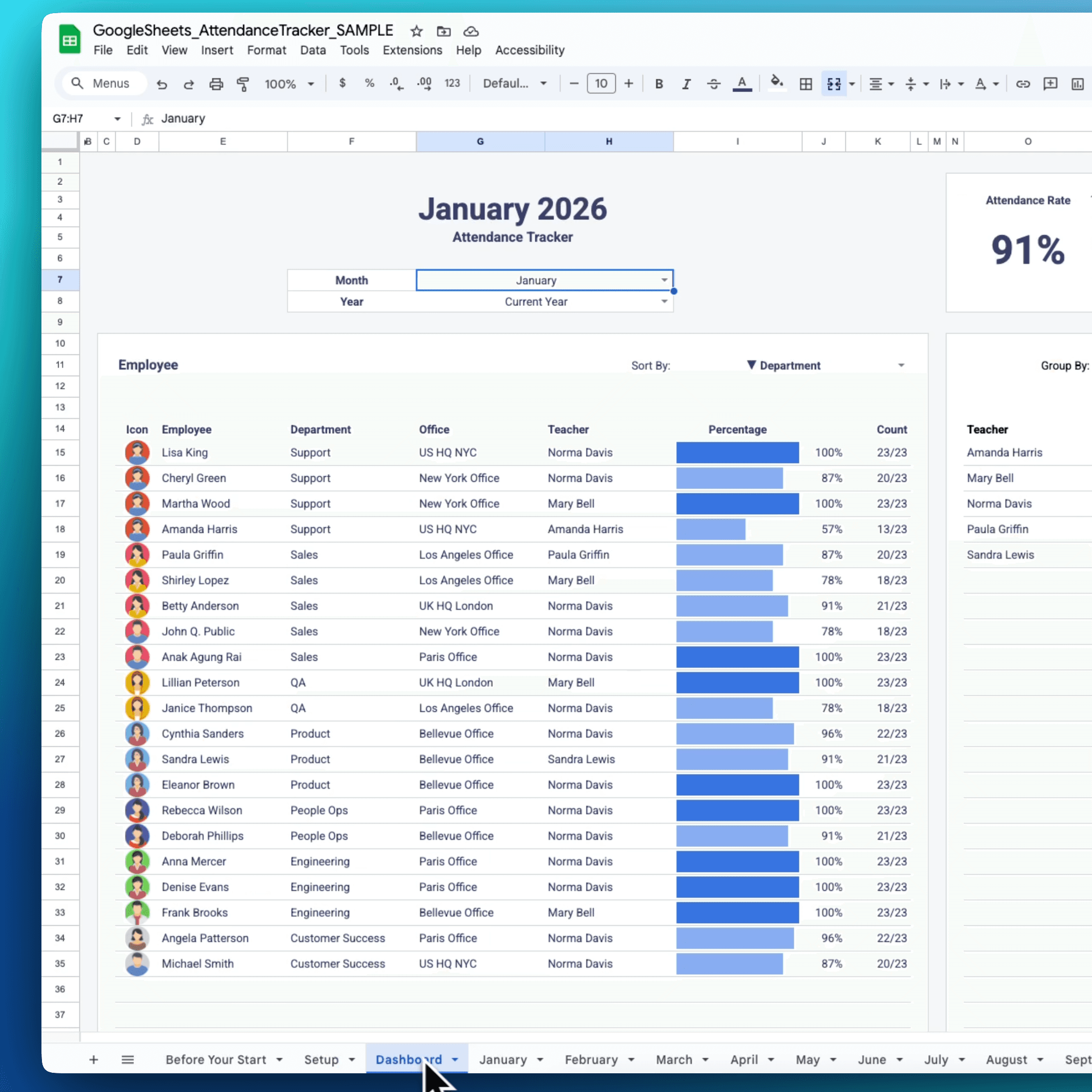
See the Full Picture Without Digging
Raw daily marks tell you nothing at a glance. The Dashboard tab turns your data into instant insights—pick a month, sort however you want, and spot trends or issues immediately.
See the Full Picture Without Digging
Raw daily marks tell you nothing at a glance. The Dashboard tab turns your data into instant insights—pick a month, sort however you want, and spot trends or issues immediately.
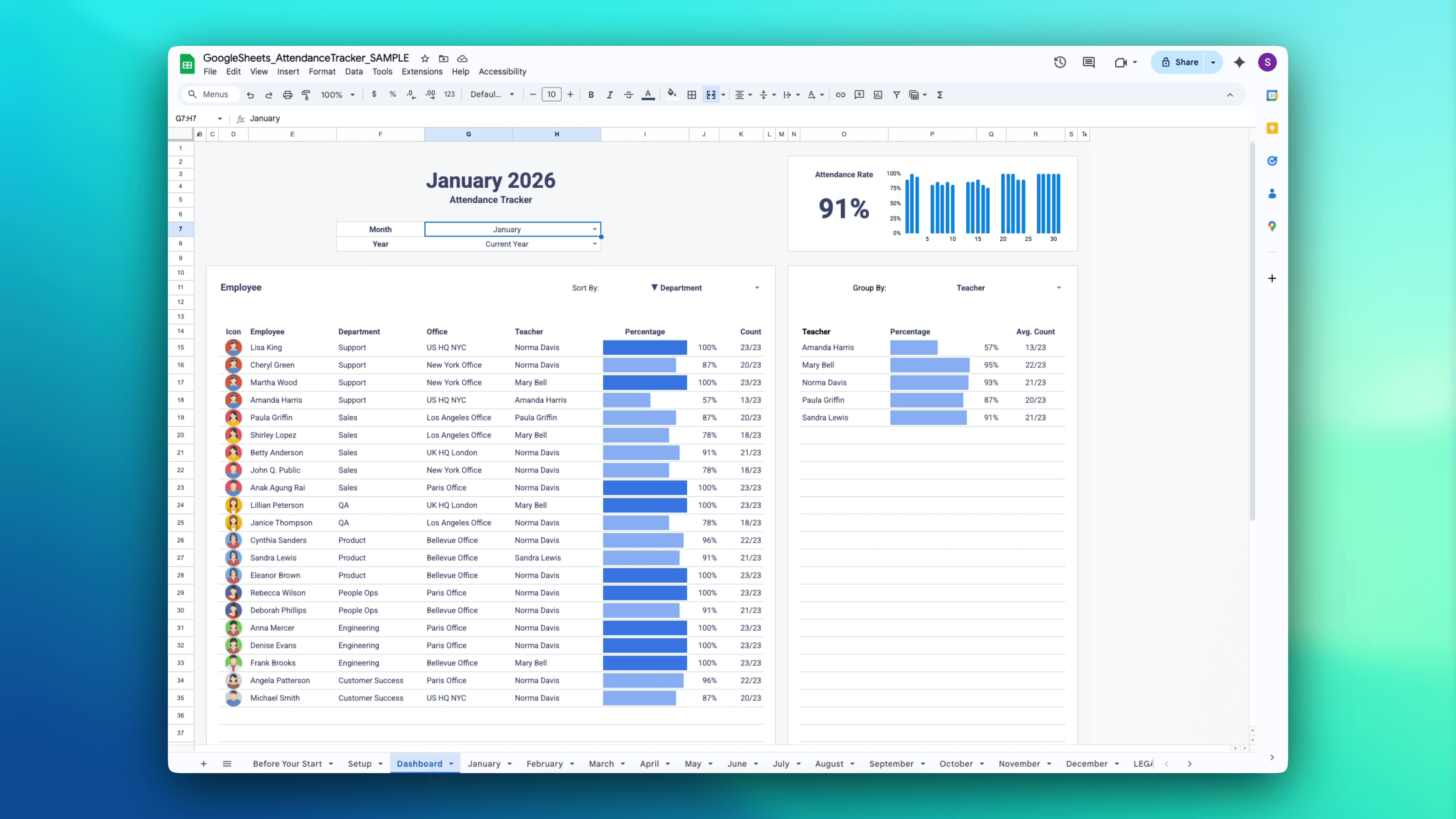
See the Full Picture Without Digging
Raw daily marks tell you nothing at a glance. The Dashboard tab turns your data into instant insights—pick a month, sort however you want, and spot trends or issues immediately.
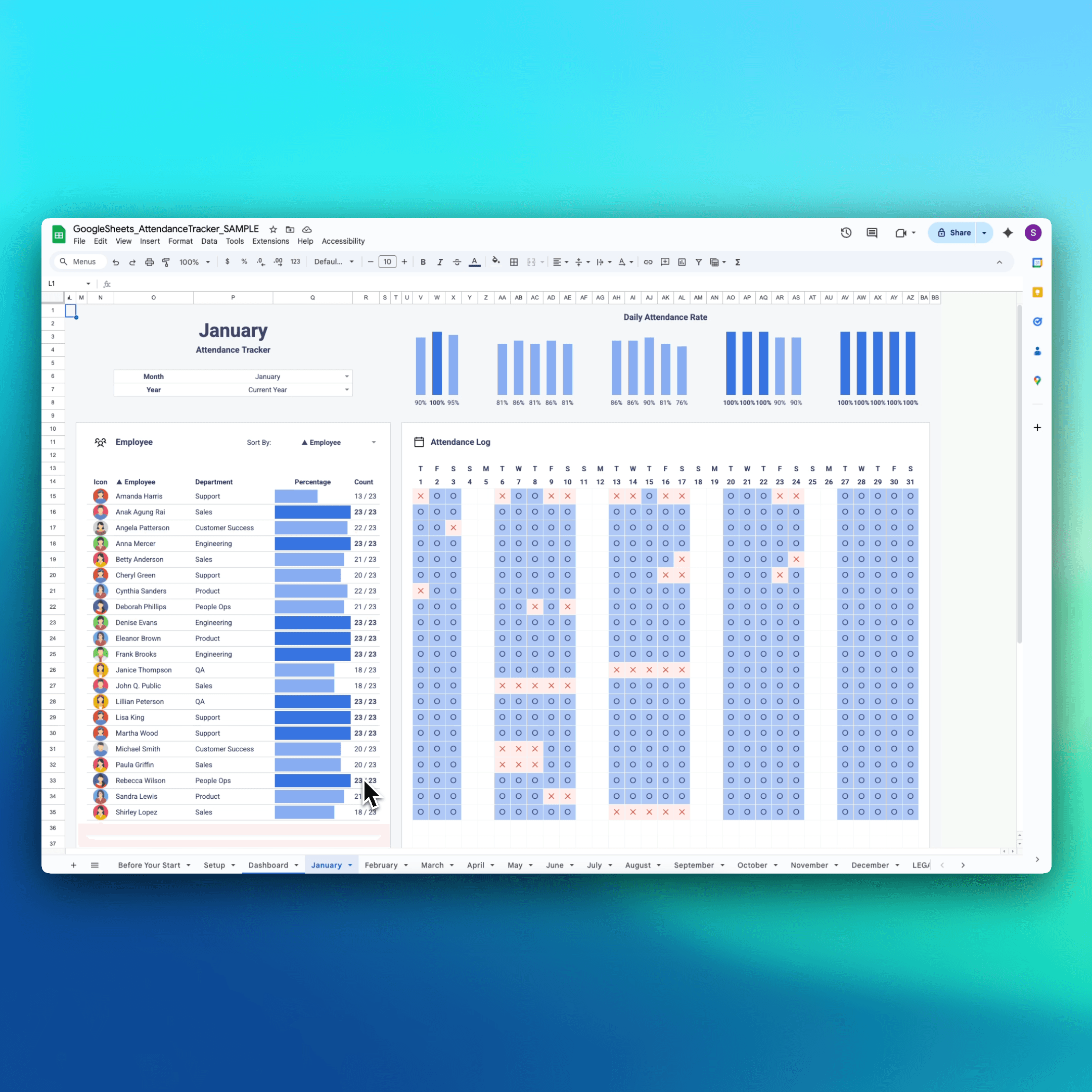
Mark Attendance in Seconds, Every Day
Tracking shouldn’t feel like busywork. Each of the 12 pre-built monthly tabs gives you a simple calendar grid—mark with checks, X’s or circles, and let totals calculate themselves.
Mark Attendance in Seconds, Every Day
Tracking shouldn’t feel like busywork. Each of the 12 pre-built monthly tabs gives you a simple calendar grid—mark with checks, X’s or circles, and let totals calculate themselves.
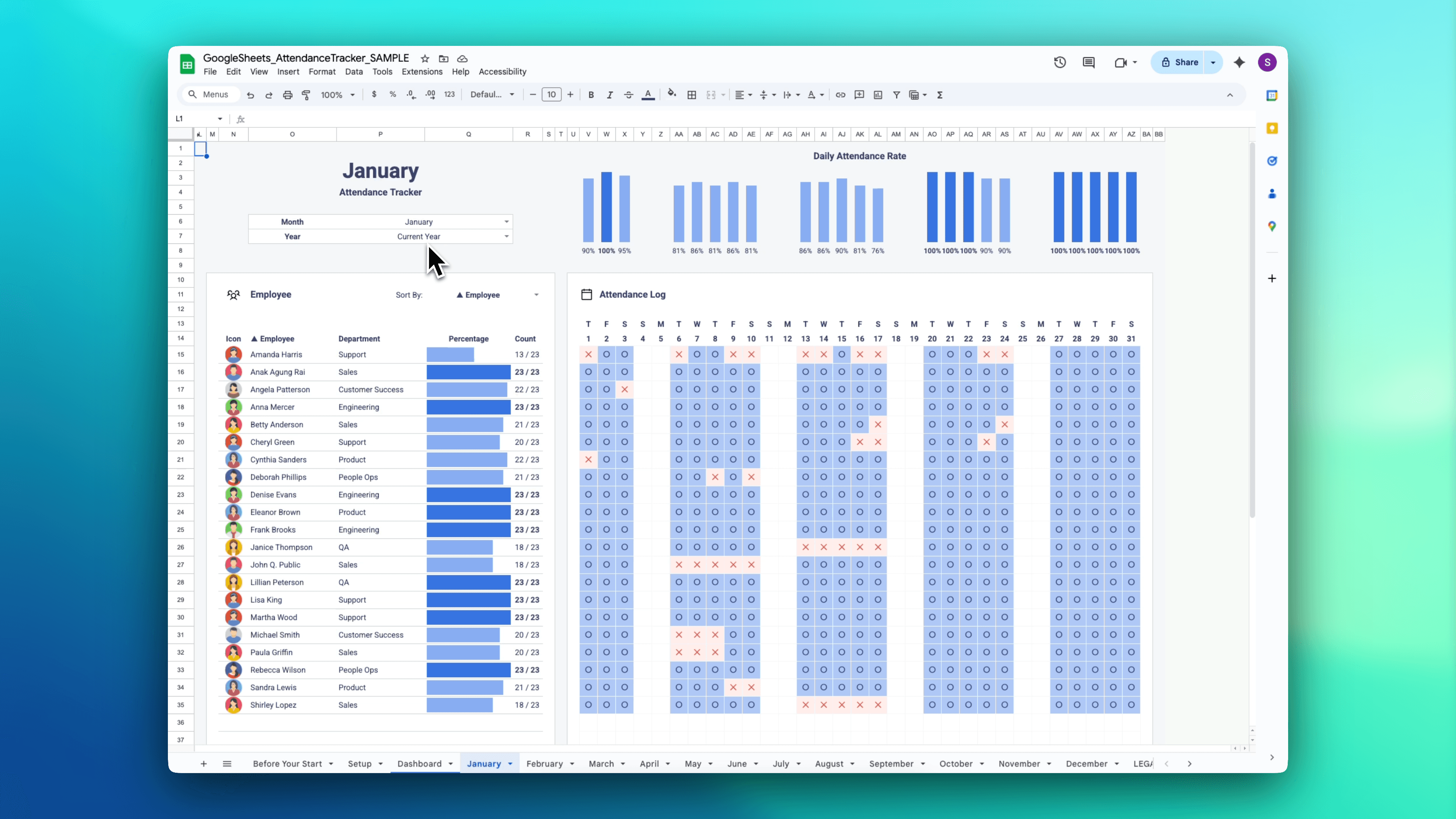
Mark Attendance in Seconds, Every Day
Tracking shouldn’t feel like busywork. Each of the 12 pre-built monthly tabs gives you a simple calendar grid—mark with checks, X’s or circles, and let totals calculate themselves.
Clean Rosters
Set up a roster once and reuse it for classes, teams, or groups.
Clean Rosters
Set up a roster once and reuse it for classes, teams, or groups.
Clean Rosters
Set up a roster once and reuse it for classes, teams, or groups.
Quick Check-In
Mark attendance in seconds without clutter or extra columns.
Quick Check-In
Mark attendance in seconds without clutter or extra columns.
Quick Check-In
Mark attendance in seconds without clutter or extra columns.
Instant Totals
Automatic counts and summaries save you from manual tallying.
Instant Totals
Automatic counts and summaries save you from manual tallying.
Instant Totals
Automatic counts and summaries save you from manual tallying.
Easy Export
Share a clean copy for records, admin, or payroll as needed.
Easy Export
Share a clean copy for records, admin, or payroll as needed.
Easy Export
Share a clean copy for records, admin, or payroll as needed.
Built For
Built For
Built For Simple Attendance Tracking In Excel & Google Sheets
If you just need something that’s easy to update and easy to report on, this is the no-drama way to do it.
If you just need something that’s easy to update and easy to report on, this is the no-drama way to do it.
NOT FOR YOU IF...


VS

BUILT FOR YOU IF...
We needed something simple that people would actually keep up with. The checkmarks make it fast to use, and the summaries give me a quick read on attendance without extra work. It’s been easy to maintain week after week.

Samantha E.
Office Manager
We needed something simple that people would actually keep up with. The checkmarks make it fast to use, and the summaries give me a quick read on attendance without extra work. It’s been easy to maintain week after week.
Samantha E.
Office Manager
We needed something simple that people would actually keep up with. The checkmarks make it fast to use, and the summaries give me a quick read on attendance without extra work. It’s been easy to maintain week after week.
Samantha E.
Office Manager
How It Works
How It Works
3 Easy Steps To Get Started
1. Purchase Once
No account needed upfront. Complete checkout to unlock access.
1. Purchase Once
No account needed upfront. Complete checkout to unlock access.
1. Purchase Once
No account needed upfront. Complete checkout to unlock access.
2. Activate Your Access
You will receive an email to activate your license and set up your login.
2. Activate Your Access
You will receive an email to activate your license and set up your login.
2. Activate Your Access
You will receive an email to activate your license and set up your login.
3. Download and Use
Go to any template page. After your license is verified (happens automatically once logged in), click the Download buttons to download files.
3. Download and Use
Go to any template page. After your license is verified (happens automatically once logged in), click the Download buttons to download files.
3. Download and Use
Go to any template page. After your license is verified (happens automatically once logged in), click the Download buttons to download files.
Compatibility: Works in Google Sheets and Microsoft Excel 365 or Excel 2021 (or newer). Uses modern functions (LET, FILTER, UNIQUE, SORT), so it will not work in Excel 2016, 2019, or older.
Pricing
One-Time Fee for Lifetime Access to the Entire Library.
No subscriptions, no monthly or yearly renewals, no hidden fees. One purchase unlocks lifetime access to every spreadsheet template in the Mighty Template library, all built for Excel and Google Sheets.
You own the files forever - download, edit, and reuse as much as you want.
Pricing
One-Time Fee for Lifetime Access to the Entire Library.
No subscriptions, no monthly or yearly renewals, no hidden fees. One purchase unlocks lifetime access to every spreadsheet template in the Mighty Template library, all built for Excel and Google Sheets.
You own the files forever - download, edit, and reuse as much as you want.
Pricing
One-Time Fee for Lifetime Access to the Entire Library.
No subscriptions, no monthly or yearly renewals, no hidden fees. One purchase unlocks lifetime access to every spreadsheet template in the Mighty Template library, all built for Excel and Google Sheets.
You own the files forever - download, edit, and reuse as much as you want.
Help Guides
Help Guides
Need Help Getting Started?
Every template comes with a full setup guide — complete with step-by-step instructions, video tutorials, and examples — so you can start using it right away.
Related Templates
FAQ
FAQ
Frequently Asked Questions
What is this Attendance Tracker used for?
Who can use this tracker?
Can I track attendance daily?
Does the dashboard update automatically?
Can I sort or filter by team, department, or manager?
Can I use icons or visual markers instead of plain text?
How many people can I track, and can I add more?
Is this compatible with Excel and Google Sheets?
Can I see who has the best or worst attendance?
Do you offer refunds?
What is this Attendance Tracker used for?
Who can use this tracker?
Can I track attendance daily?
Does the dashboard update automatically?
Can I sort or filter by team, department, or manager?
Can I use icons or visual markers instead of plain text?
How many people can I track, and can I add more?
Is this compatible with Excel and Google Sheets?
Can I see who has the best or worst attendance?
Do you offer refunds?
What is this Attendance Tracker used for?
Who can use this tracker?
Can I track attendance daily?
Does the dashboard update automatically?
Can I sort or filter by team, department, or manager?
Can I use icons or visual markers instead of plain text?
How many people can I track, and can I add more?
Is this compatible with Excel and Google Sheets?
Can I see who has the best or worst attendance?
Do you offer refunds?
Have Questions? We're Here to Help!
Have Questions? We're Here to Help!
Reach out to our support team for any queries or assistance.
Reach out to our support team for any queries or assistance.